/images/logo.60a6dff3.svg)
Proper sensor configuration is essential for ensuring the reliable operation of a system. In certain situations, such as maintenance activities, functional checks, or alarm testing, it may be necessary to temporarily reconfigure a sensor. This allows specific conditions to be simulated and system responses to be verified without permanently affecting normal operations.
In addition to temporary adjustments, sensors may also need to be reconfigured as part of regular system updates or operational changes. For example, this can include updating alarm notification recipients, assigning a new configuration profile, or adapting sensor settings to new requirements or environments.
Important: Before performing a reconfiguration, please note that all warnings and alarms of the respective sensor will be deactivated by the system once the reconfiguration is completed. If there are any active alarms on your device, make sure to acknowledge and clear them beforehand.
Apply the Sensor Reconfiguration in elproCLOUD
Click on the sensor menu icon and select "Configuration" tab from the menu.
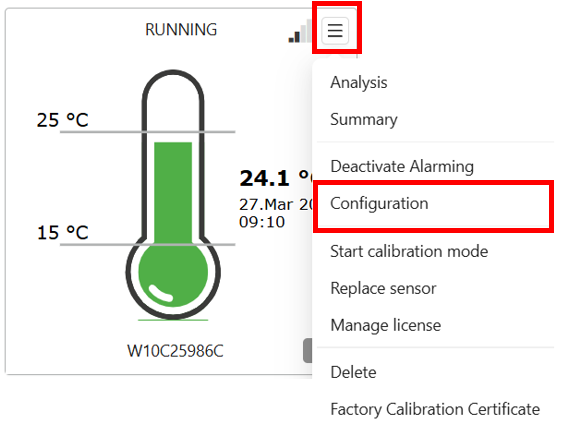
From this point onward, you will be guided through the Configuration Wizard, similar to the initial setup process.
- In the Sensor Basics section, all parameters can be adjusted except for the logging interval.
- In the Metadata section, all fields can be freely adjusted as required.
- Within Alarm Limits, you can assign a new alarm limit profile. Please ensure that the desired profile has already been created beforehand.
This section also allows you to manage alarm notification recipients, such as adding new recipients or removing existing ones.
Please note an important consideration: if SMS notifications are newly enabled, additional costs will apply. Conversely, if SMS notifications were previously active and are now removed, no refund will be issued for prior SMS charges already incurred.
- The Sensor Issue Profile can be configured in the same way as the alarm limit profile and must also be preconfigured before selection.
- Finally, you will reach the Summary Page. Here, all newly configured parameters should be carefully reviewed before completing the process.
- If no SMS notifications have been added, the License section will display a charge of CHF 0.
- If SMS notifications have been added, additional SMS fees will apply. These costs are calculated based on the remaining months of the sensor’s base license and may differ from the full annual SMS fee.
-
To complete the process, click “Buy and Start Sensor”, then press the pairing button to apply the new configuration to the device.