/images/logo.60a6dff3.svg)
|
Icon |
Name |
Description |
|
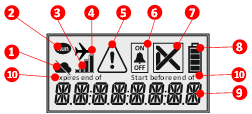
(1) |
No connection to Cloud |
No connection to Cloud possible |
|
(2) |
Run |
Measure and buffer Shown in TRANSIT (including DELAY and PAUSE) |
|
(3) |
Communication strengths |
Not visible if radio off / flight-mode |
|
(4) |
Flight-mode |
Automated detection (Auto on/off) Manual on/off via Menu > RADIO.ON / RADIO.OFF |
|
(5) |
Warning |
Warning (configurable) for - Temperature warning limit - Communication warning - Tilt/light/shock warning (not in version 1) - Low battery warning (not in version 1) |
|
(6) |
Alarm On/Off |
Shows if Alarm criteria are active or paused |
|
(7) |
Alarm Status |
Display (configurable in future versions) OK or Alarm (pushed from Cloud) After excursion, Alarm will remain on display |
| (8) |
Battery level |
4 battery levels (Level one: approximately 30 days runtime remaining) |
|
(9) |
Eight-digit display |
Various functions, e.g. - temperature - status - customer field (e.g. pallet no.) |
|
(10) |
Start before end of / Expires end of |
Latest possible start of device / End of runtime |