/images/logo.60a6dff3.svg)
Preparing for Battery Replacement
- Gather new batteries:
- 2x Alkaline AA Batteries for an application range between 0°C .. +55°C
- 2x Lithium AA Batteries for an application range between -35°C .. +55°C
- Ensure that you have a stable and well-lit workspace.
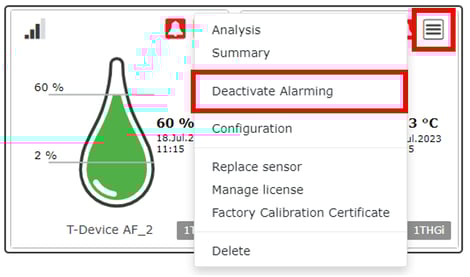
- Open the elproCLOUD and go to the Dashboard.
- Open the sensor menu of the corresponding device.
- Deactivate the Alarming during battery replacement. This ensures that no deviation occur.
Removing the Old and Inserting New Batteries
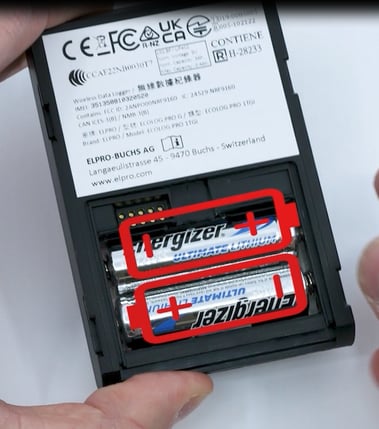
- Open the battery compartment on the back of the ECOLOG-PRO xG and check the position and orientation of the old batteries.
- Carefully remove the old batteries one at a time.
- Take the new batteries and confirm their correct orientation, matching the positive and negative terminals with the markings inside the battery compartment.
- Insert the new batteries one by one into the compartment, ensuring a snug fit. Make sure they are placed in the correct positions according to the polarity markings.
Closing
- Slide back the cover of the battery compartment. Ensure that everything is properly aligned.
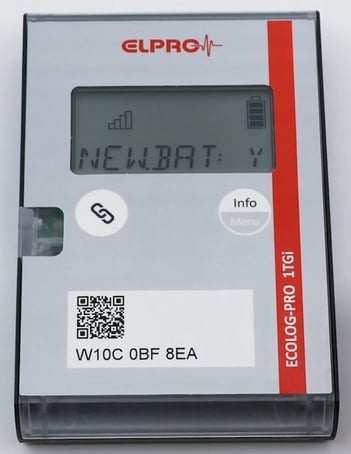
- Press the Info/Menu button for 3 seconds while "New.Bat: Y" appears on the LCD to confirm that you have inserted new batteries..
-
If you have not inserted new batteries, press the Info/Menu key only briefly until the display shows "New.Bat: N" appears. Then press the same button again for 3 seconds to confirm.
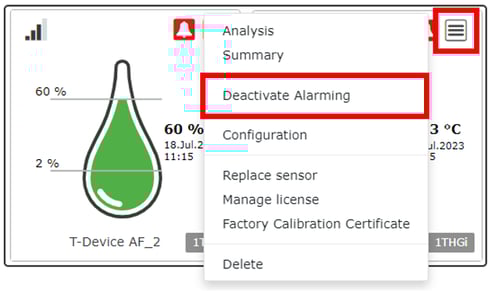
- Go again to the sensor menu in the elproCLOUD to activate the alarming.
Important: When a low battery warning is displayed, the device automatically switches to power-saving mode and communicates only every 6 hours to conserve power.
After replacing the batteries, it is important to confirm the battery exchange on the device (NEW.BAT: Y). If the replacement is not confirmed, the device may continue to show an empty battery icon and remain in power-saving mode.
Furthermore, when replacing the batteries with a different battery type (alkaline batteries instead of the recommended ENERGIZER® ULTIMATE LITHIUM AA), the displayed battery level may be incorrect. To reload the correct battery capacity settings, reboot the device by pressing both buttons simultaneously for at least 10 seconds.